

Download DjVu To PDF Converter – Fast, Secure & Free DjVu to PDF Tool
Overview
DjVu To PDF Converter is a lightweight desktop utility designed to turn DjVu files—often used for scanned books, technical manuals, and high‑resolution images—into the universally accepted PDF format. The software targets both casual users who need a quick one‑click conversion and professionals handling large batches of documents for archiving or sharing. With a clean, minimalistic interface, the program removes the learning curve typical of many file‑conversion suites.
Users can drag and drop files, select an output folder, and let the engine process the conversion in seconds. While the resulting PDFs may be slightly larger than the original DjVu files, the trade‑off is a format that works on every operating system, from Windows and macOS to mobile platforms via companion apps. Occasional minor formatting quirks—such as marginal shifts in image alignment—are rare and usually corrected with a quick re‑export.
Overall, DjVu To PDF Converter offers a reliable, secure way to make your documents accessible without paying for costly subscription services.
Key Features & Capabilities
- One‑Click Conversion: Transform a single DjVu file into PDF with just a click.
- Batch Processing: Convert multiple DjVu documents simultaneously, saving time on large projects.
- Preserve Image Quality: Retains the high‑resolution graphics of the source DjVu while generating clear PDFs.
- Simple UI: Intuitive drag‑and‑drop interface that requires no technical knowledge.
- Fast Engine: Optimized conversion algorithm reduces processing time even on modest hardware.
- Secure Conversion: All files are processed locally; no internet upload ensures privacy.
- Cross‑Platform Output: PDFs produced are compatible with Windows, macOS, Linux, Android, and iOS viewers.
- Customizable Output Folder: Choose where converted PDFs are saved to keep your workflow organized.
- Free Version Available: Basic conversion features are free, with optional paid upgrades for advanced options.
Installation & Usage Instructions
Step‑by‑Step Installation
Downloading and installing DjVu To PDF Converter is straightforward. Follow these steps to get the software up and running on your computer:
- Visit the official website and click the Download button for your operating system (Windows or macOS).
- Once the installer file (
.exefor Windows,.dmgfor macOS) is saved, double‑click to launch the installer. - Accept the End‑User License Agreement, then choose the default installation folder or specify a custom path.
- Click Install. The process typically completes within 30 seconds on a modern PC.
- After installation, launch the program from the desktop shortcut or start menu.
How to Convert DjVu Files
Using DjVu To PDF Converter is as simple as a few mouse clicks:
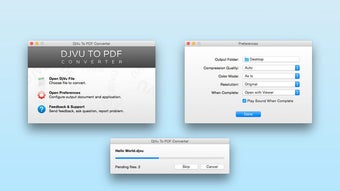
- Open the application; the main window displays a large drop zone labeled “Drag DjVu files here”.
- Drag one or multiple DjVu files into the zone, or click the Add Files button to browse your folders.
- Choose the destination folder for the PDFs by clicking the Browse button under “Output Folder”.
- If you are converting a batch, you can reorder files by dragging them up or down—useful when you need a specific order in the final PDF collection.
- Click the Convert button. A progress bar appears, showing the status of each file.
- When the conversion finishes, a confirmation pop‑up appears, and you can open the output folder directly from the program.
For power users, the settings menu offers options to embed metadata, set PDF version compatibility, and enable compression levels to manage file size. The program also supports command‑line parameters for automation in scripts, making it suitable for integration into larger document‑management pipelines.
Compatibility, System Requirements & Technical Details
Supported Operating Systems: Windows 7, 8, 10, 11 (both 32‑bit and 64‑bit) and macOS 10.13 (High Sierra) or later. A companion mobile app is available for Android 6.0+ and iOS 12+ that allows conversion on the go, though the desktop version remains the most feature‑rich.
Minimum System Requirements:
- CPU: Intel Core i3 or equivalent (2 GHz minimum)
- RAM: 2 GB (4 GB recommended for batch processing)
- Disk Space: 50 MB for installation; additional space required for temporary conversion files.
- Graphics: Any GPU that supports basic 2D rendering (no heavy GPU needed).
The software does not require an internet connection after download, making it ideal for offline environments where data security is a priority. All conversions happen locally, ensuring that confidential documents never leave your machine.
From a technical perspective, DjVu To PDF Converter uses the open‑source DjVuLibre library for decoding DjVu files and the PDFSharp library for PDF generation. This combination provides high fidelity in preserving image layers and text blocks while delivering PDFs that adhere to the PDF/A standard for long‑term archiving.
Pros & Cons, FAQ, and Final Verdict
Pros
- Free version provides essential conversion features without watermarks.
- Batch conversion saves hours for large document collections.
- Local processing guarantees privacy and security.
- Simple drag‑and‑drop UI reduces learning curve.
- Fast conversion engine handles high‑resolution images efficiently.
Cons
- Resulting PDFs can be larger than the original DjVu files.
- Occasional minor formatting issues with complex multi‑page layouts.
- No built‑in OCR; scanned text remains image‑based unless processed separately.
- Advanced PDF options (e.g., encryption, digital signatures) are only available in the paid upgrade.
Frequently Asked Questions
Can I convert DjVu files on a Mac?
Yes. DjVu To PDF Converter offers a native macOS installer that works on macOS 10.13 and newer. The interface and features are identical to the Windows version.
Is the software safe to use for confidential documents?
Absolutely. All conversions are performed locally on your computer; no files are uploaded to external servers, ensuring that sensitive information remains private.
What is the maximum file size I can convert?
The free version handles files up to 100 MB each. The paid version removes this limit, allowing conversion of very large scanned collections.
Does the program support command‑line automation?
Yes. Advanced users can invoke the converter via command line with parameters for input path, output directory, and compression level, enabling batch scripts or integration with document‑management systems.
Will the converted PDF retain searchable text?
DjVu files that contain embedded OCR text will keep that text layer in the PDF, making the output searchable. Pure image‑only DjVu files will produce image‑based PDFs; you’ll need a separate OCR step to add searchable text.
Conclusion & Call to Action
DjVu To PDF Converter fills a niche that many larger conversion suites overlook: a fast, secure, and free tool dedicated solely to turning DjVu archives into universally readable PDFs. Its batch processing, local‑only workflow, and straightforward UI make it a strong choice for students, researchers, and professionals who regularly deal with scanned documents. While the output files can be larger and the free version lacks some high‑end PDF features, the core functionality is solid and reliable. If you need a hassle‑free way to share DjVu content with colleagues, clients, or on any device, this converter is ready to download and use right now.
Ready to get started? Click the button below to download DjVu To PDF Converter for free and transform your documents instantly.
Rating: 4.5 / 5
DjVu To PDF Converter delivers exactly what it promises—a quick, secure conversion from DjVu to PDF without unnecessary bloat. The batch mode and local processing are standout features, and even though the free version produces larger PDFs, the trade‑off for privacy and speed is well worth it. The occasional formatting glitch is minor and can be corrected with a re‑export. Overall, it’s a reliable utility that earns a solid 4.5‑star rating.







